Hacker Holidays — Day 14: Management Wants a Word
A KAPE triage image of an abandoned laptop yields one saved Chrome password, decrypted entirely offline through a DPAPI masterkey → Local State → AES-GCM chain, which turns out to be the passphrase for a hidden VeraCrypt volume holding the real evidence.

Event: Hacker Holidays — The Byte Lotus Hotel · Day 14 · Forensics Points: 90
Briefing
It was always her. It was never a bug; it was the business model.
Housekeeping found a guest’s laptop left behind after an early checkout, Room 214, registered to “Vera.” IT pulled a full triage before wiping it for the next guest.
A hint from @0xMia on the room page: “ok so apparently a browser will remember
things for you that you never told anyone else 💀 not every hidden file needs a
password cracker, some of them just need a really good memory also why did Patch tell
me this version number 1.26.29 idk what it means :(”
Itinerary:
- Take a closer look at what she left behind
- Some things aren’t as locked away as she thought
- Find out what she was hiding, and claim the flag
Recon — Identifying the Artifacts
The provided zip is a KAPE triage image rooted at KAPE/C/..., mirroring a real
Windows filesystem:
unzip management-wants-a-word-forensics-hh-day-14-*.zipNotable paths under KAPE/C/Users/vera/:
AppData/Local/Google/Chrome For Testing/User Data/Default/Login Data— Chrome saved passwords (DPAPI-encrypted)AppData/Local/Google/Chrome For Testing/User Data/Local State— holds Chrome’s own AES key, itself DPAPI-protectedAppData/Roaming/Microsoft/Protect/S-1-5-21-.../{Preferred, c90719ef-...}— vera’s DPAPI masterkey filesDocuments/backup— an untyped, headerless, high-entropy 100 MB fileKAPE/C/Windows/System32/config/{SAM,SYSTEM,SECURITY}— registry hives, needed to derive vera’s credentials offline
The “browser remembers things… not every hidden file needs a password cracker” hint pointed straight at recovering a Chrome-saved credential via offline DPAPI decryption, rather than brute-forcing anything.
Recovering the Saved Chrome Login
Pulled the saved login directly from the SQLite Login Data database:
sqlite3 "Login Data" "select origin_url, username_value, hex(password_value) from logins;"http://bytelotus.thm:8080/|VeraSecretVault|763130C88A72A64F35F63E883EA0A7F64A6870E46B0BBB469A756EDA88B7E324C3E1C51015AA6FD8D65AC48961E1EA324CE1707807FEB3D7The blob starts with 763130 = "v10" in ASCII — Chrome’s AES-256-GCM
encrypted-credential format. To decrypt it: unwrap the DPAPI masterkey → use it to
unwrap Local State’s os_crypt.encrypted_key → use that as the AES key on the login
blob.
Getting vera’s Credentials Offline
Dumped the local SAM/LSA secrets straight from the hive files with Impacket, no live host required:
secretsdump.py -sam SAM -system SYSTEM -security SECURITY LOCALvera:1000:aad3b435b51404eeaad3b435b51404ee:1241186a4aac4f34f4bf7ace71b396a8:::
[*] DefaultPassword
(Unknown User):miniveravera’s NT hash matched Administrator’s (password reuse), and an LSA
DefaultPassword secret (autologon) leaked her actual password: minivera.
Unwrapping the DPAPI Masterkey
dpapi.py masterkey -file c90719ef-5b98-474e-b934-136d606a702a \
  -sid S-1-5-21-2529683458-431225740-1723070931-1000 -password minivera
Decrypted key: 0x5e5715ec9b6df5a86e97902692a66d28e691f05d5bc1e04d0159cfe960e94c978c07e5004a0179d3a96df2468885a28175b0b02cc064445f116a752d2b3e9d40Unwrapping Chrome’s AES Key
Chrome prefixes its Local State os_crypt.encrypted_key with the literal string
DPAPI before the raw blob — stripped that off first:
import json, base64
d = json.load(open("Local State"))
raw = base64.b64decode(d["os_crypt"]["encrypted_key"])
assert raw[:5] == b"DPAPI"
open("/tmp/encrypted_key.bin", "wb").write(raw[5:])
dpapi.py unprotect -file /tmp/encrypted_key.bin -key 0x5e5715ec9b...e9d40Successfully decrypted data
0000 20 6A 39 A0 97 13 27 EA 94 87 E4 AE A9 84 4F 5D
0010 36 70 16 24 56 98 22 76 93 9A 71 26 46 DA 0B 02Decrypting the Saved Password
With Chrome’s raw AES-256 key recovered, decrypted the v10 GCM blob (3-byte prefix +
12-byte nonce + ciphertext+tag):
from cryptography.hazmat.primitives.ciphers.aead import AESGCM

key = bytes.fromhex("206a39a0971327ea9487e4aea9844f5d3670162456982276939a712646da0b02")
blob = bytes.fromhex("763130C88A72A64F35F63E883EA0A7F64A6870E46B0BBB469A756EDA88B7E324C3E1C51015AA6FD8D65AC48961E1EA324CE1707807FEB3D7")

nonce, ct = blob[3:15], blob[15:]
print(AESGCM(key).decrypt(nonce, ct, None))b'Wh4t1sV3raD0inG0nTh1sH0st'Opening the Hidden Container
Naively trying that password as an AES-CBC passphrase against Documents/backup
produced garbage — the file’s exact 100 MB size and complete lack of any
header/magic bytes (unlike a normal encrypted file, which usually carries at least a
salt/IV marker) was the real tell: this is a VeraCrypt volume. VeraCrypt volumes
have no identifiable header since the header itself is encrypted, which is exactly why
file just reported data.
Mounted it with cryptsetup’s VeraCrypt-compatible tcrypt mode, using the recovered
Chrome password as the volume passphrase:
sudo cryptsetup open --type tcrypt --veracrypt "Documents/backup" veracrypt_backup
# passphrase: Wh4t1sV3raD0inG0nTh1sH0st

sudo mkdir -p /mnt/vera_backup
sudo mount /dev/mapper/veracrypt_backup /mnt/vera_backup
ls -la /mnt/vera_backup
# $RECYCLE.BIN secret_financial_documents System Volume InformationFinding the Flag
secret_financial_documents/transactions_q3.csv contained mostly mundane hotel
expenses, except for one line:
2026-07-12,TXN-10531,Internal Adjustment,Image asset correction,0.00,Archived“Image asset correction” pointed at important_invoice_byte_lotus.pdf in the same
folder — pdftotext returned nothing, because the entire invoice is a single embedded
scanned image (confirmed via pdfimages -list). Extracted and viewed that image
directly:
pdfimages -all important_invoice_byte_lotus.pdf /tmp/invoice_imgThe extracted invoice’s line-item description field contained the flag in plain text, disguised as an invoice entry:
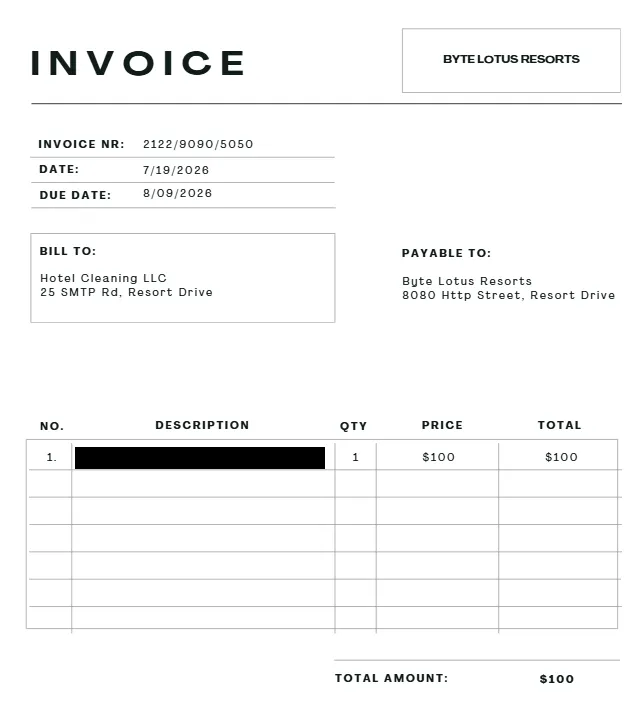
Flag
THM{redacted}Summary / Chain
- KAPE triage image → Chrome
Login Datahad one saved credential forbytelotus.thm:8080, AES-256-GCM encrypted (v10blob). secretsdump.pyagainst offlineSAM/SYSTEM/SECURITYhives → vera’s NT hash (reused from Administrator) + an LSADefaultPasswordsecret:minivera.dpapi.py masterkeywith SID +minivera→ decrypted vera’s DPAPI masterkey.- Used the masterkey to unwrap
Local State’sos_crypt.encrypted_key(after stripping theDPAPIprefix) → Chrome’s raw AES key. - AES-256-GCM decrypt of the saved login blob → recovered password
Wh4t1sV3raD0inG0nTh1sH0st. Documents/backup: exactly 100 MB, zero header bytes → identified as a VeraCrypt volume (not a simple AES-encrypted file).cryptsetup open --type tcrypt --veracryptwith the recovered password → mounted the hidden volume.transactions_q3.csv“Image asset correction” line → pointed at the invoice PDF’s embedded scanned image.pdfimages -allextracted the image → flag was written directly into the invoice line items.
Takeaways
- DPAPI-protected secrets can be fully recovered offline with just the registry
hives and the right SID/password — no live host, no admin session on the target
needed.
secretsdump.py+dpapi.pycover the whole chain. - An LSA
DefaultPassword(autologon) secret is a direct plaintext credential leak sitting in theSECURITYhive — always check it when you have offline hive access. - A file with no header, no magic bytes, and a suspiciously round size (100 MB) is the signature of a VeraCrypt/TrueCrypt container. The absence of any identifiable structure is the fingerprint, since the container’s own header is encrypted.
- Financial/audit trails can be recon data. An oddly-worded ledger line (“Image asset correction”) was the pointer to where the real payload was hidden — worth reading every row, not just scanning for big numbers.
- Scanned-image PDFs defeat
pdftotextby design — always confirm withpdfimages -listbefore concluding a PDF has no extractable text, and pull the embedded image directly when it does.